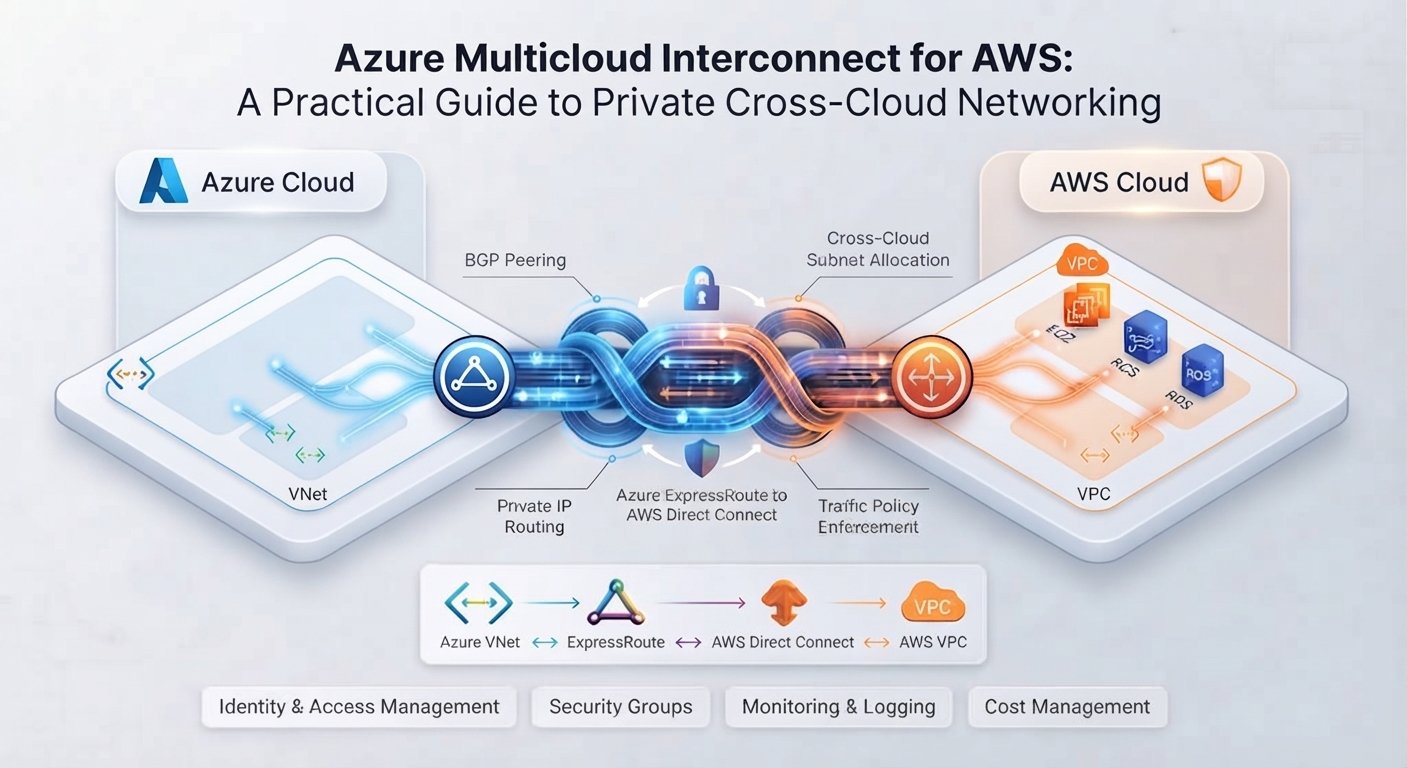
Connecting Microsoft Azure and Amazon Web Services privately has traditionally required careful coordination between cloud providers, network carriers, colocation facilities, and internal infrastructure teams.
Azure Multicloud Interconnect for AWS aims to simplify that process. Introduced by Microsoft and AWS in August 2026, the service provides managed, private connectivity between Azure and AWS through a more integrated cloud-native experience.
For cloud practitioners, the main benefit is not simply another connection option. It is the possibility of replacing a custom multicloud networking project with a provider-managed service.
This guide explains how Azure Multicloud Interconnect works, what it simplifies, its current limitations, and what teams should evaluate before using it.
What Is Azure Multicloud Interconnect for AWS?
Azure Multicloud Interconnect is a managed Azure networking service that connects Azure environments to supported external cloud providers through private infrastructure.
Its initial integration uses AWS Interconnect – multicloud, the corresponding AWS service for establishing private connections with other cloud platforms.
Together, the services create a dedicated network path between Azure and AWS without routing application traffic over the public internet.
On the Azure side, the connection uses Azure ExpressRoute. On AWS, it can connect with networking resources such as:
- Amazon Virtual Private Cloud
- AWS Transit Gateway
- AWS Cloud WAN
- Direct Connect Gateway
Microsoft and AWS manage the physical cloud-to-cloud infrastructure, underlying capacity, and provider-side connectivity. Customers continue to manage their virtual networks, routing policies, security controls, and applications.
How Azure-to-AWS Private Connectivity Traditionally Works
Before this managed service, organizations commonly used one of three approaches.
Site-to-Site VPN
A virtual private network is usually the fastest way to connect Azure and AWS. It encrypts traffic but carries it over the public internet.
VPNs work well for proofs of concept, low-volume workloads, and backup connections. However, internet routing can introduce unpredictable latency and performance.
ExpressRoute and AWS Direct Connect
Organizations can combine Azure ExpressRoute and AWS Direct Connect through a colocation facility or connectivity partner.
This creates a private path but often requires teams to coordinate:
- Physical circuits and cross-connects
- Provider provisioning
- Border Gateway Protocol configuration
- Virtual routers or network appliances
- Redundancy across multiple locations
- Monitoring and incident escalation
The architecture can be reliable, but deployment and troubleshooting may involve several vendors.
Multicloud Networking Providers
Third-party platforms can simplify cross-cloud connectivity and centralized routing. They may also provide useful policy, segmentation, and observability features.
The trade-off is an additional vendor, management platform, support boundary, and pricing model.
Azure Multicloud Interconnect and AWS Interconnect – multicloud reduce these dependencies by making the cloud providers responsible for more of the connection.
How Azure Multicloud Interconnect Works
The provisioning process uses an activation mechanism shared between Azure and AWS.
A simplified implementation looks like this:
- Create the multicloud connection with one provider.
- Select the destination cloud, region, and available bandwidth.
- Receive an activation key for the connection.
- Redeem the key with the other cloud provider.
- Attach the connection to the required Azure and AWS networks.
- Configure routing, security, DNS, and monitoring.
The providers manage the physical connection and provider-facing infrastructure. Customers do not need to build the underlying cross-connect arrangement themselves.
This reduces operational complexity, but it does not eliminate network engineering. Cloud teams must still control which networks and workloads can communicate across the connection.
Key Benefits for Cloud Practitioners
Faster Cross-Cloud Provisioning
Traditional private connectivity may take weeks or months to coordinate. A provider-managed service can reduce the number of procurement, provisioning, and implementation steps.
This is particularly useful for migrations, acquisitions, distributed applications, and temporary projects that cannot justify a large custom network deployment.
Private Network Transport
Traffic travels through dedicated private connectivity instead of the public internet. This can provide more consistent network behavior for workloads that regularly exchange data between clouds.
Microsoft and AWS also describe encryption on the physical infrastructure connecting the provider routers.
Private transport does not replace workload encryption, identity controls, or network segmentation. It should be considered one layer in a broader security architecture.
Fewer Operational Boundaries
A conventional Azure-to-AWS design can involve Microsoft, AWS, a carrier, a colocation provider, and a network appliance vendor.
Provider-managed connectivity reduces the number of customer-managed components. It may also make incident escalation clearer because Microsoft and AWS jointly operate more of the inter-cloud path.
Support for Multicloud Applications
Potential use cases include:
- Azure applications accessing services hosted on AWS
- Phased migrations between AWS and Azure
- Cross-cloud disaster recovery
- Centralized monitoring and security platforms
- Data-processing and artificial intelligence pipelines
- Connectivity following mergers and acquisitions
- Workloads using specialized services from both providers
The strongest use cases have a clear technical or business reason for operating across clouds. Multicloud architecture should not be adopted only because connectivity has become easier.
Architecture and Security Considerations
A private interconnect creates reachability, not automatic trust.
Practitioners should evaluate:
- IP address planning: Azure virtual networks and AWS VPCs must use non-overlapping address ranges.
- Route control: Limit route propagation to the networks that genuinely require cross-cloud communication.
- Segmentation: Use security groups, network security groups, firewalls, and routing domains to isolate workloads.
- DNS: Define how private names will resolve between Azure and AWS.
- Application encryption: Continue using TLS for sensitive application traffic.
- Identity: Enforce least privilege independently of the network path.
- Observability: Monitor latency, throughput, packet loss, route changes, and connection health.
- Resilience: Decide whether VPN or another private path is required as a backup.
Teams should also document ownership. A cross-cloud incident may involve Azure networking, AWS networking, security, application, and platform teams.
Pricing and FinOps Considerations
Azure states that Multicloud Interconnect is free during its public preview. Current Azure information also indicates that general-availability pricing will be announced later.
AWS uses its own pricing model for AWS Interconnect – multicloud. Charges can depend on factors such as bandwidth, local AWS Region, traffic-origin regions, and the assigned pricing tier. AWS currently indicates that there are no per-gigabyte data-transfer charges for the interconnect itself, although connected services can create additional costs.
Before deployment, FinOps and networking teams should model:
- Hourly or monthly interconnect charges
- Azure and AWS gateway costs
- Transit Gateway or Cloud WAN processing
- Firewall and inspection costs
- Monitoring and logging
- Backup connectivity
- Post-preview Azure pricing
- Traffic growth over time
Preview pricing should never be treated as the expected long-term production cost.
Current Limitations
Azure Multicloud Interconnect for AWS is still in preview, so production planning requires caution.
Important considerations include:
- Regional availability is limited.
- Azure currently supports AWS as its initial provider integration.
- Available bandwidth depends on the provider, location, and preview offering.
- Azure does not provide a service-level agreement during preview.
- Features, pricing, regions, and limits may change before general availability.
Teams should confirm the latest restrictions in the official documentation rather than designing from announcement information alone.
Should You Use Azure Multicloud Interconnect?
Azure Multicloud Interconnect is worth evaluating when an organization needs regular, private communication between Azure and AWS but wants to avoid assembling the provider-edge infrastructure manually.
It may be a good fit for:
- Planned Azure-to-AWS migrations
- Hybrid applications intentionally distributed across both clouds
- Organizations consolidating connectivity after an acquisition
- Data-intensive workloads requiring more predictable network performance
- Teams seeking to reduce reliance on colocation infrastructure
A site-to-site VPN may remain more appropriate for low-volume traffic, short-lived testing, or locations not yet supported by the service.
For critical production workloads, preview status and the absence of an Azure service-level agreement are important constraints. A controlled proof of concept is the safest starting point.
Final Thoughts
Azure Multicloud Interconnect for AWS makes private cross-cloud networking more accessible by moving much of the physical connectivity and provider coordination behind managed services.
It does not eliminate routing, security, observability, resilience, or FinOps responsibilities. What it changes is the operational boundary: Microsoft and AWS manage more of the transport while customers focus on their connected networks and applications.
For practitioners, the next step should be a non-critical pilot. Measure provisioning time, throughput, latency, failover behavior, operational visibility, and total cost before considering broader adoption.
Frequently Asked Questions
Does Azure Multicloud Interconnect use the public internet?
No. It creates private connectivity between Azure and AWS through provider-managed infrastructure.
Does it replace Azure ExpressRoute?
No. Azure Multicloud Interconnect uses ExpressRoute technology on the Azure side. ExpressRoute also remains relevant for private connectivity between Azure and customer or colocation environments.
Is Azure Multicloud Interconnect free?
Microsoft states that the Azure service is free during public preview. AWS and connected networking services may still generate charges, and Azure pricing can change at general availability.
Is Azure Multicloud Interconnect production-ready?
It is currently a preview service without an Azure service-level agreement. Organizations should evaluate it through a controlled pilot and verify current support conditions before using it for critical workloads.
What is the difference between a VPN and Azure Multicloud Interconnect?
A VPN encrypts traffic across the public internet. Azure Multicloud Interconnect provides a dedicated private path managed by Microsoft and AWS, offering potentially more predictable connectivity.